Posted Date : 04 Jul 2026
For most of MCP's life, a tool call has meant one thing: a request goes out, JSON comes back, and Claude reads through that JSON to tell you what it found. That model is simple, and it has held up well, but it has an obvious ceiling. A database query might return hundreds of rows. A design tool might return a file you actually want to look at and edit. A monitoring tool might need to show you something that changes every few seconds. Text can describe all of that, but it can't let you touch it.
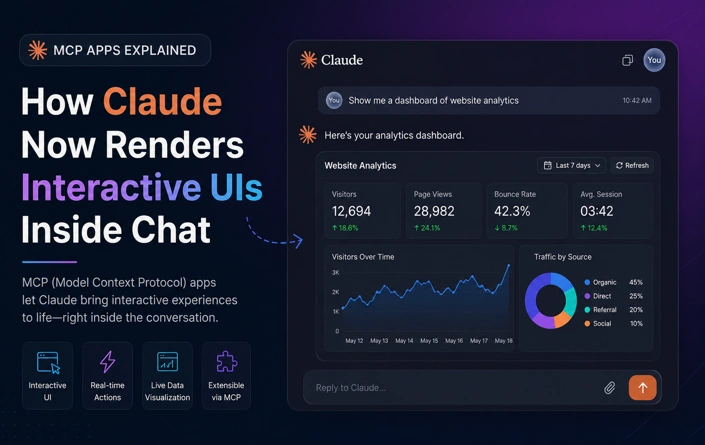
MCP Apps closes that gap. Launched on January 26, 2026, as the first official extension to the Model Context Protocol, it lets MCP servers return interactive HTML interfaces—dashboards, forms, charts, and document viewers—that render directly inside the conversation in Claude and a growing list of other AI hosts.
MCP Apps wasn't built in isolation. The extension (tracked in the spec as SEP-1865) was proposed in November 2025 and developed jointly by Anthropic's MCP maintainers, OpenAI, and the community behind MCP-UI, drawing on both MCP-UI's existing work and OpenAI's Apps SDK. That's a notable detail on its own: two companies that compete directly on almost every other axis sat down and built a shared standard rather than shipping competing, incompatible versions of the same idea. The result is that a developer who builds an MCP app once can have it run in Claude, ChatGPT, VS Code, Goose, and other compliant hosts without writing client-specific code for each one.
The mechanics are straightforward once you see the pieces:
ui:// URI scheme alongside its normal tool definition—for example, ui://weather/widget. A tool's metadata links it to that resource.postMessage API, using MCP's existing JSON-RPC message format with UI-specific methods under a ui/ prefix.The practical effect is that Claude stays in the loop throughout. It sees what you do inside the interface and can respond to it, while the interface itself handles everything that text genuinely can't: live updates, native media viewers, state that persists as you interact with it, and direct manipulation like dragging, sorting, or zooming.
The obvious benefit is visual—a sortable table beats a wall of JSON, and a real map beats a list of coordinates. But there are two less obvious advantages worth calling out.
It cuts down on round trips. Consider a tool that queries a database and returns hundreds of rows. Without MCP apps, every refinement—"sort by revenue," "just show me last week," and "what's the detail on row 47"—is a separate prompt and a separate model turn. With an interactive table rendered in the interface, sorting and filtering happen locally in the UI. No tool call, no round trip to the model, and the interaction feels instant because it is.
It reduces what actually has to pass through Claude's context. A search tool that returns tens of kilobytes of results typically does so only so the model can boil it down into a sentence or two—most of that payload never mattered to begin with. When the same data renders as a table or dashboard in the interface, the model can work from a summary while the full data lives in the browser, not in the context window.
MCP apps make the most sense wherever a back-and-forth conversation would be slower than a rich interface, including:
Rendering arbitrary HTML from a third-party server inside an AI conversation is, on its face, a meaningful attack surface — running UI from an MCP server means running code you didn't write inside your MCP host. The spec addresses this with several layers of defense rather than one:
postMessage, and the host controls exactly which capabilities — like which tools an app is permitted to call — are exposed to it.Whether these defenses hold up as the ecosystem scales is something the community is actively watching, but the design intent is explicit: MCP Apps should extend what a tool can do without quietly expanding what a malicious server could do to the host or the user.
Claude shipped MCP Apps support on day one, alongside nine launch partners spanning analytics, project management, design, file storage, data enrichment, business intelligence, and communication: Amplitude, Asana, Box, Canva, Clay, Figma, Hex, monday.com, and Slack, with Salesforce confirmed as coming soon. In practice, that means a Claude conversation can already render an Amplitude analytics chart you explore interactively, a Figma file you review inline, or an Asana project timeline you update without leaving the thread — all through the Claude directory, and multiple apps can run within the same conversation.
Support isn't limited to Claude. VS Code, Goose, Postman, MCPJam, and Archestra. AI and Microsoft 365 Copilot have also shipped or announced support, and ChatGPT is rolling it out as well—which means a developer building an MCP app today gets a genuinely cross-platform surface, not a Claude-specific one.
MCP Apps is a small technical change with a fairly large implication: it moves AI chat interfaces from something you talk to into something you can also work inside. Anthropic has described the effect as making Claude's chat environment function more like a cross-application layer, where you don't have to leave the conversation to accomplish the task the conversation is about — a shift with some resemblance to what web browsers did to native desktop applications a generation earlier.
For developers, the open specification and available SDK mean the barrier to building one is genuinely low, and the app runs everywhere MCP Apps is supported without extra engineering per platform. For everyone else, the practical result is quieter: fewer moments where you have to stop chatting and go open another tab to actually get something done.
Have a project in mind? Let’s build something amazing together.
Webbitech — A Leading Web Design & Web Development Company with 15+ Years of SEO & Digital Marketing Expertise, Delivering Countless Success Stories
From idea to execution, we help businesses create high-performing websites and applications.
Start your journey today and take your brand to the next level.